
VoIP App vs Call Forwarding isn’t just a technical choice—it affects answer rates and professionalism. When you call back from a mobile, many people ignore unknown numbers. With the MIH VoIP app, you answer and return calls on your mobile while showing your business landline as caller ID. That means more answered calls, a consistent brand identity, and your personal number stays private. Below are 5 proven pros that help you stop missed calls and work flexibly—from mobile, desktop softphone, or VoIP handset—without losing your business identity.
- Returning calls from an unknown mobile gets ignored more often.
- The MIH VoIP app shows your business landline as caller ID → higher answer rates.
- Keep your personal number private while looking professional on every device.
- Built-ins: Business Hours, Do Not Disturb, out-of-hours voicemail (protect your downtime).
- Scale easily: add users, ring groups, adapters or desk handsets as you grow.
| Feature | Call Forwarding → Mobile | MIH VoIP App |
|---|---|---|
| Outgoing caller ID | Shows mobile | Shows business landline |
| Answer rate | Often lower (unknown mobile ignored) | Higher (recognised business number) |
| Multi-user | 1 device per number | Multiple users/devices & ring groups |
| Call controls | Limited | Transfer, hold, mute, voicemail |
| Business hours | Manual | Timers, DND, out-of-hours routing |
| Call recording | Rare | Optional 30-day archive (with notice) |
| Scales as you grow | Clunky | Add users, extensions, handsets anytime |
Tip: enable call recording only with caller notice. We can add a short pre-call announcement.
Stop Missed Calls: VoIP App vs Forwarding (5 Proven Pros)
This relates more to those who run a Business from home, or a small business.
Many small businesses divert landline to a mobile. We can do that—but there’s a better option.
When you call customers back from your mobile, they see a mobile number. With spam and scam calls on the rise, unknown mobiles are often ignored. That means fewer answered calls and missed opportunities.
With MIH VoIP, you can use our VoIP app to answer and make calls on your mobile while showing your business landline as the caller ID. Incoming calls to your landline ring in the VoIP app; call back from the VoIP app, and customers recognise your number.
Benefits
- Higher answer rates and a more professional image
- Keep your personal number private
- One number across devices, wherever you work
- VoIP features like mute, hold, transfer and voicemail
Keep the convenience of a mobile—without losing your business identity.
The following VoIP features are included in your package from us.
Call Timers – Protect your downtime—without missing leads
Running a small business is hectic. You deserve time with family and friends without worrying about unanswered calls.
With MIH VoIP, set clear Business Hours, and our call timers will do the rest. Calls to your Business Landline outside those hours go straight to your out-of-hours voicemail. Need a break during the day? Toggle Do Not Disturb and relax—no guilt, no overthinking.
What you get
- Automatic routing outside Business Hours
- One-tap Do Not Disturb in the app
- Professional out-of-hours voicemail greeting
- A tidy list of missed calls to follow up when you’re ready
Enjoy your downtime and keep every opportunity queued up for tomorrow.
Call Recording (30-Day Archive for free, upgrades available)
Capture every detail. We can enable a feature to automatically record all inbound and outbound calls, storing them securely for 30 days so you can replay, verify information, train staff, or resolve disputes. Access recordings anytime to search, listen, and download. This feature is available upon request.
Why it helps
- Clear audit trail for queries and complaints
- Better training and quality control
- No more missed notes or misunderstandings
Compliance note (important):
Always inform callers or people you have called that the call is being recorded. Without proper notice/consent, recordings may not be usable in a dispute. We can add a Call Greeting to automatically cover you for incoming calls, see below.
(Please check your local/legal requirements.)
Call Greeting
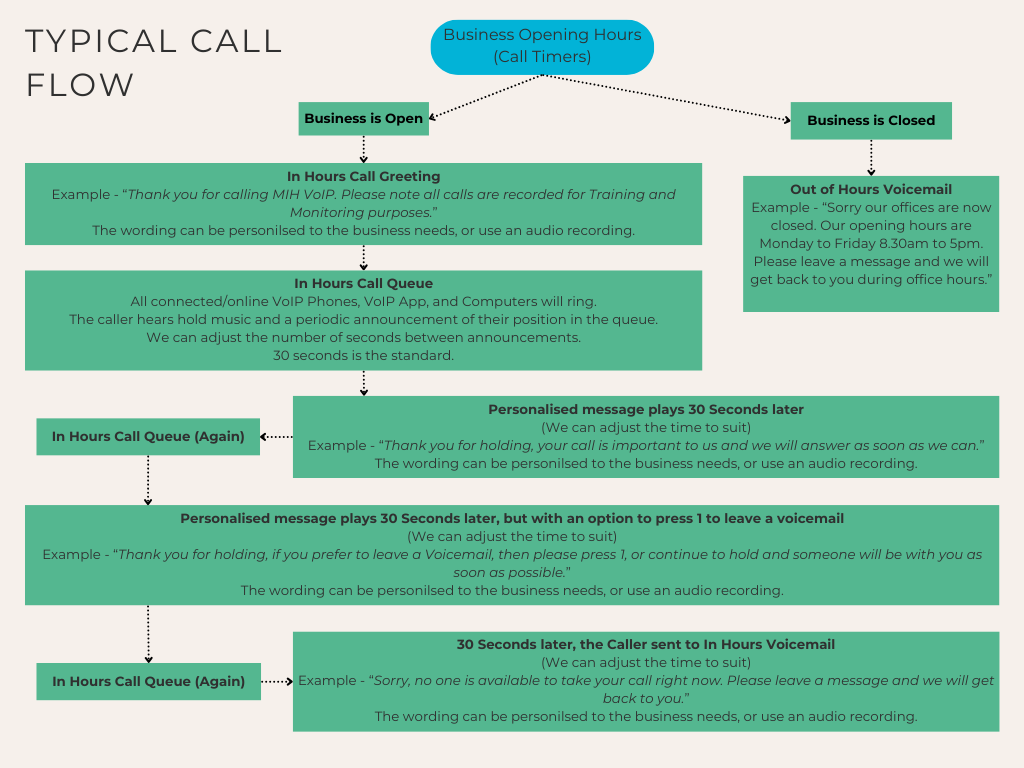
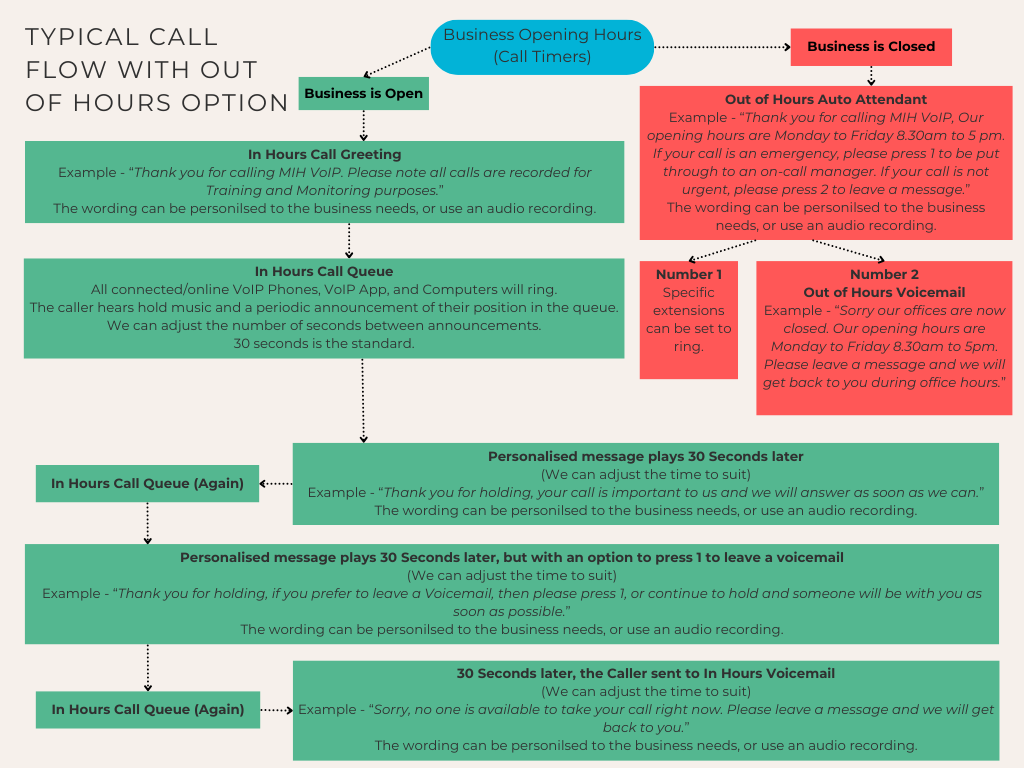
Add that professional touch to your business with a call greeting that your callers hear before your handset rings. A simple recording can be something like below, but the wording can be anything you like; you can even send us a recording, and we can use that.
In Hours Call Greeting…
Thank you for calling MIH VoIP, please note all calls are recorded for training and monitoring purposes.
If the business is closed, then use the Out of Hours Voicemail message…
Our offices are now closed. Our opening hours are Monday to Friday 8.30 am to 5 pm. Please leave a message and we will get back to you during office hours.
Call Queues & Flows
Already on a call, but another call is potentially coming in? We can set up a call queue so your callers are held in a queue and will hear on-hold music and a periodic message to let them know they are in a queue, their position in the queue and that their call will be answered soon.
Not enough time to answer the call?
For couples who run a business together.
Some of our customers are partners in life and in work. With MIH VoIP, both of you can use the VoIP app on your own mobiles while a VoIP Adapter sits at home—so your single business number works everywhere.
Why it’s handy
- Easy call transfer and shared voicemail
- Both mobiles ring on the business number
- Call back showing your business caller ID
- Optional individual extensions (e.g., 201 & 202)
Time to scale your business up?
From spare room to small team—MIH VoIP grows with you.
Start as one person, then add a partner, a family member, or a Virtual Assistant. Keep the same business number and simply add users and devices as you go.
Mix & match devices
- VoIP app (mobile): answer anywhere, show your business caller ID
- Softphone (computer): take and place calls from your laptop/desktop
- VoIP Adapter (home): keep using your existing cordless/corded phone
- VoIP Desk Handsets: when you’re ready for a more permanent setup
Scale-up features
- Optional call recording
- Extensions & ring groups
- Call transfer and shared voicemail
- Business hours & out-of-hours routing
Q1: Will customers see my business number when I call from the app?
A1: Yes—calls from the MIH VoIP app show your business landline as caller ID on mobile or desktop.
Q2: Can more than one person answer the same number?
A2: Yes—use ring groups so multiple mobiles/computers can answer; transfer between users easily.
Q3: What happens outside business hours?
A3: Set Business Hours—after hours route to voicemail with a greeting or to an on-call user; DND is available.
Q4: Can I record calls?
A4: Yes—optional 30-day recording archive. Always inform callers that recording is active (check local requirements).