

For many people, VoIP is still new, and anything new can feel daunting at first. There is a lot of confusion about when to take action. That’s why we’ve created our VoIP Onboarding Guide below — to simplify the steps based on your current setup, whether you’re switching providers, moving home, or upgrading to full fibre (FTTP).
The VoIP Onboarding Guide helps you choose the right onboarding type and shows exactly when to order VoIP, how number porting fits in, and how to avoid service downtime when switching broadband or providers. And most importantly, avoid losing your Landline Number. The UK landline switch-off and number porting process is regulated by Ofcom, but that doesn’t mean the process has to feel complicated.
If you’re with Virgin Media or Kingston, the process is slightly different, and we’ve covered those scenarios further down the page.
Switching Providers and “One Touch Switching” (OTS).
“One Touch Switching” (OTS) allows the new provider to close the old provider’s account and simplifies switching providers. You can learn more here. However, please use caution when a landline number is involved.
Refer to the Flowchart below to determine when to avoid providing OTS information:
- Onboarding Type 1: Do NOT complete the OTS information.*
- Onboarding Type 2: We need to port the landline number before the broadband switches to the new provider. Otherwise, access to using the landline number will be lost.
*If the option “My Provider is not listed” appears when completing your new Broadband order form, selecting it will not trigger OTS.
We recommend contacting the old provider after the landline number has ported to us, to formally cancel services.
VoIP Onboarding Guide
These answers are crucial—please double-check. We rely on the information you provide and can’t be held responsible if it’s incorrect.
VoIP Onboarding Guide
Answer a few questions by clicking the blue boxes or relevant picture, and we’ll show the correct onboarding type and timings.
Do you have a landline service, and do you wish to keep it?
If you don’t have an existing landline service but require a new number then click yes.
Do you have an existing landline number you would like to keep?
We can arrange to port your existing landline number across to us.
How does your landline handset currently connect?


Does your router plug into a traditional telephone socket on the wall, or into a fibre modem (ONT)?
ONT = the small fibre box used on Full Fibre Broadband (FTTP).
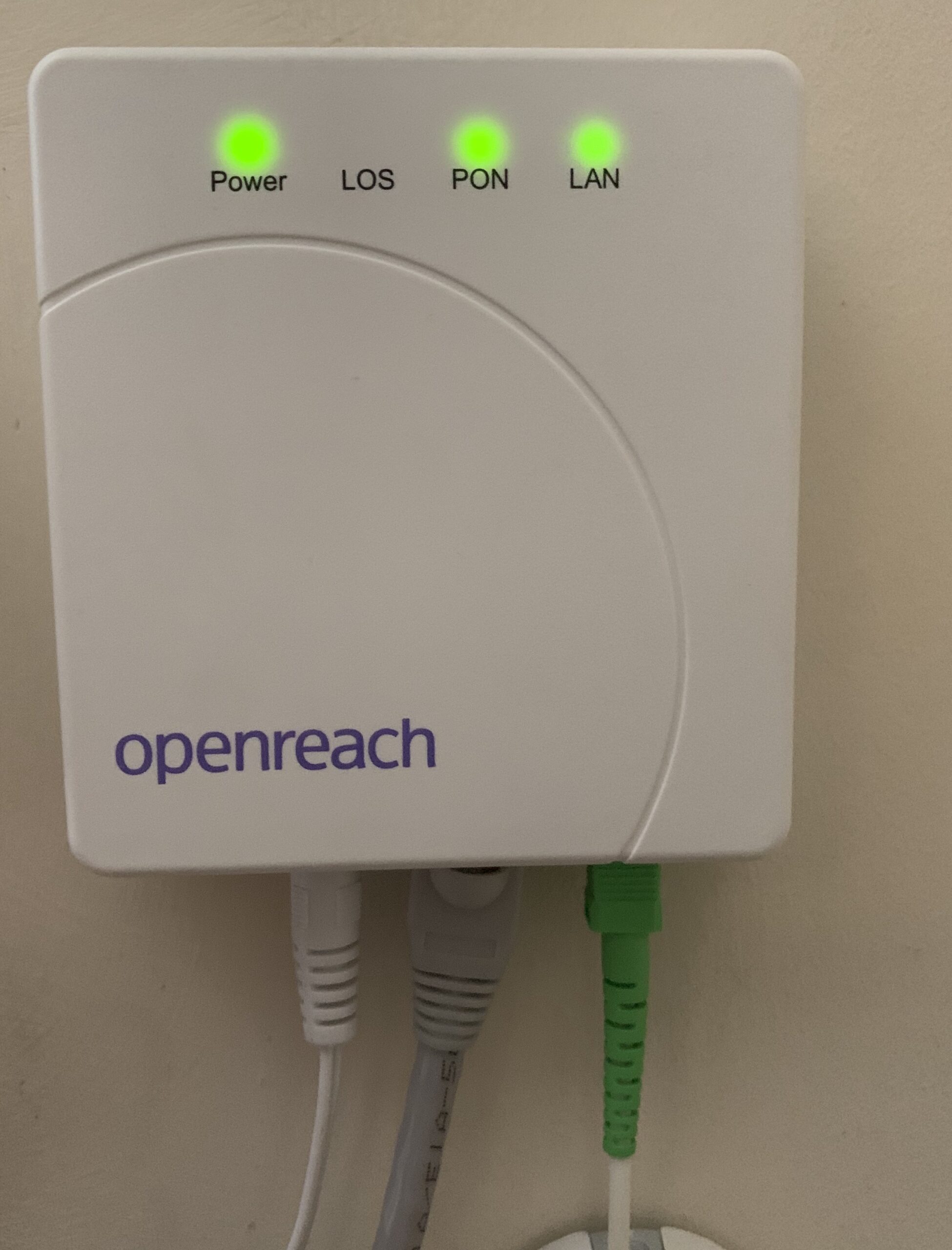
Is Full Fibre Broadband (FTTP) available at your address?
Often shown as Fibre 100 / 300 / 500 / 900 / 1000.
Is a SoGEA connection available?
Often shown as Fibre 40 / 80 (SoGEA).
✅ No need to worry about VoIP
You don’t want to keep a landline, so VoIP isn’t required.
ℹ️ No need for VoIP yet
Based on your answers, the Big Switch Off is unlikely to affect your area/customer yet.
- If Full Fibre (FTTP) Broadband is available, then place the order for it.
- Do NOT complete the “One Touch Switching” information.
- Essential: Do NOT cancel your existing service with the current provider until AFTER the Landline Number has ported across to us.
- Essential: The Fibre engineer must NOT remove the connections for your existing service. You are advised to explicitly inform the Engineer to leave the existing service alone due to porting the Landline Number to a VoIP Provider.
- If the Full Fibre (FTTP) Broadband install is definitely going ahead, place your VoIP order.
- Please notify us of the intended Full Fibre (FTTP) Broadband install date.
- Once the Full Fibre (FTTP) Broadband has been installed and is working, please contact us to let us know and give us final permission to port the number (this ceases the old line + broadband).
- Approximately 3 Business days after we request to port your landline number to us, we will email the Number port date to you.
- The Number Port typically takes 10 business days; the existing landline will continue to work, providing the service and account are live. The VoIP Adapter (if ordered) is programmed and dispatched during this time.
- We will email to say when the port completes. This is the time to plug the landline handset into the VoIP Adapter (if ordered) and make & receive a test call. Also make & receive a test call via the VoIP App.
- We need to port your landline number on the same day the new broadband goes live.
- Place your VoIP Order with us as soon as possible so we have everything we need, ensuring you complete the VoIP Order Form, Direct Debit Mandate and Number Port Authority Form.
- Place the order to switch your existing Full Fibre (FTTP) Broadband service to your chosen new provider.
- Tell us the date the new provider will take over the service. We will request that your Landline Number ports on the same date.
- If the go-live date is less than 14 days after completing your order with us, you may need to contact the new provider to delay the go-live date.
- The Number Port typically takes 10 business days; the existing landline will continue to work, providing the service and account are live. The VoIP Adapter (if ordered) is programmed and dispatched during this time.
- We will email to say when the port completes. This is the time to plug the landline handset into the VoIP Adapter (if ordered) and make & receive a test call. Also make & receive a test call via the VoIP App.
🟦 Onboarding Type 3 (New Number)
- Place VoIP Order Steps 1 & 2 and state your desired area code.
- Customer setup typically completes in ~1–5 business days.
- If your order includes a VoIP Adapter, we’ll dispatch it as soon as possible. The adapter will work immediately once it is plugged into the mains electric and connected to a live, working broadband connection. When it arrives, connect your landline handset to the VoIP Adapter and make a quick test call (outgoing and incoming). Please also make and receive a test call using the VoIP App.
⚠️ SoGEA Available: Porting an existing Landline number is not straightforward
In this scenario, porting the landline number is not straightforward, nor easy. Learn more here. A new landline number is often easier (see Onboarding Type 3).
Virgin Media & Kingston Customers
If you are a customer with Virgin Media or Kingston and switching to Full Fibre (Openreach or CityFibre), porting your landline is simple.
Option 1 — Install Full Fibre first, then port your number (Recommended)
We recommend having your new Full Fibre service installed and working first, just in case there are any delays or issues with the installation. This is a cautious approach, but in practice we do see some installations delayed or rescheduled.
Delays can happen for many reasons, such as the need for digging, high-level access, obstructions, or network infrastructure issues. Sometimes it’s simply down to technical problems — and as we all know, technology doesn’t always behave perfectly.
Once your Full Fibre is installed, live, and working, we can immediately start the number porting process on our side. We do recommend completing your application with us before the Full Fibre installation takes place, so we can keep in touch, track progress, and move things forward as soon as your broadband is ready.
Option 2 — Port your landline number before Full Fibre is installed
Our VoIP service works over any broadband connection. So, if your current Virgin Media or Kingston package already includes broadband, we can port your number before your new Full Fibre service goes live.
However, if your current package does not include broadband, then your new Full Fibre service must be installed and active before we can port your number.
The VoIP Adapter requires a working broadband connection. The VoIP App can work over any mobile network using mobile data if Wi-Fi is not available.
Common Questions…
-
How long does it take to port a Landline number?
It takes between 7 and 21 days to port a landline number, but it typically takes 10 Business days on average.
-
When do I cancel my existing services?
The existing Landline service must NOT be cancelled until after we port it across. The existing Landline number must be live for us to be able to port it across.
-
Am I notified when my Landline Number will port across?
We always email the customer in advance (usually 3 days before) with the port date and helpful information. Like below…
The number port can take up until 8pm on the day.
There is no action you need to take at the moment, this is just for your information.
For now, please leave your handset plugged in as it is, and continue using your Landline as you normally would.
On the day, you may notice that your Landline Number has ported if you can no longer make/receive any calls with your Landline Handset plugged into the connection, feel free to plug your Landline Handset into the VoIP Adapter and make and receive a test call to ensure all is working as it should.
We will email you on the day the Number Port has been completed, and request you plug your Landline Handset into the VoIP Adapter and make and receive a test call to ensure all is working as it should if you haven’t already done so.
Please don’t hesitate to let us know if you have any questions at all.Have a great day!
After verifying the service is live and calls work, we inform the customer that their first bill is typically due the following month.
-
Am I ever without my landline number?
No, you will notice on the day the Landline Number ports across that your existing connection has stopped working. This means your Landline number is now with us and accessible by the VoIP Adapter (if ordered and/or VoIP App.
Lean on us, we’re here to help with support.
VoIP Onboarding Flowchart
These answers are crucial—please double-check. We rely on the information you provide and can’t be held responsible if it’s incorrect.
It might look complex at first glance, but once you follow the flowchart or walk through a real-life example, it quickly becomes clear and easy to understand.
